Remote working guide for design institutes-Using Alibaba Cloud to build a team collaborative work platform
Remote working guide for design institutes-Using Alibaba Cloud to build a team collaborative work platform
Official Account: Non-Deconstructive · Author: Zhou Wenqi (Venchy)
With the recent outbreak of the new coronavirus, I believe many design teams have adopted the work-from-home model. Although online communication and conferencing apps such as DingTalk and Enterprise WeChat have filled our daily life of working from home, they can meet our daily work communication and meeting needs. But for architects and engineers, working from home prevents us from logging into the company’s server, and we cannot use the company’s P disk. In this way, we lose a smooth capital raising platform, and we cannot create working files based on a collaborative working mode. All CAD drawings can only be bound online through DingTalk Enterprise WeChat, and the required files cannot be shared, which greatly reduces our work efficiency. We must have had this kind of trouble when we were working before: the company network disk was too stuck, or we couldn’t connect to the company server after going home on weekends, and we had to go to the company to work overtime. The company’s servers will not be open to everyone on the public Internet due to security issues. Based on this, we can try to use Alibaba Cloud to create a public P disk for the team. In this way, no matter where you are, as long as your computer can connect to the Internet, you can have the same work experience of logging in to the P disk as if you were in the company. As long as your team uses it, your team will no longer have to go to the company to work overtime on weekends. All members of the team can work based on this cloud platform. Without further ado, let’s start our tutorial.
- Basic configuration
An Alibaba Cloud account 布置centos的阿里云服务器 Samba protocol
二.购买阿里云服务器
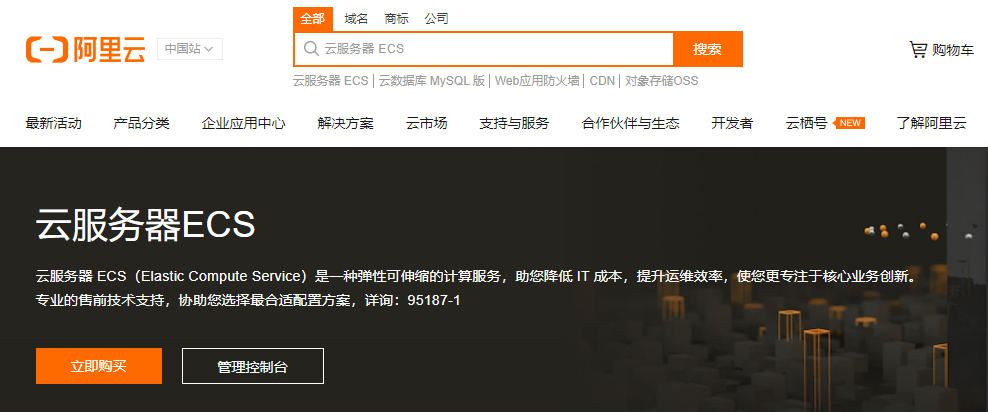
Enter the purchase page and select the server type to purchase according to your needs: Among them, pay attention to the following points: (1) Region and available area: In theory, choose a server that is physically close to you; (2) The instance specification belongs to the server configuration, which defines the number of cores of the server CPU and the capacity of the server hard disk. The editor chose the most basic configuration here, one CPU, one core, 40GB hard drive, 60 yuan per month. (3) Mirror, that is, the selected server operating system. The editor chooses centos, which is commonly used for server configuration. After purchasing an Alibaba Cloud server, you can log in to your server in the following ways: (1) Click Remote Connection on the Alibaba Cloud service area management page
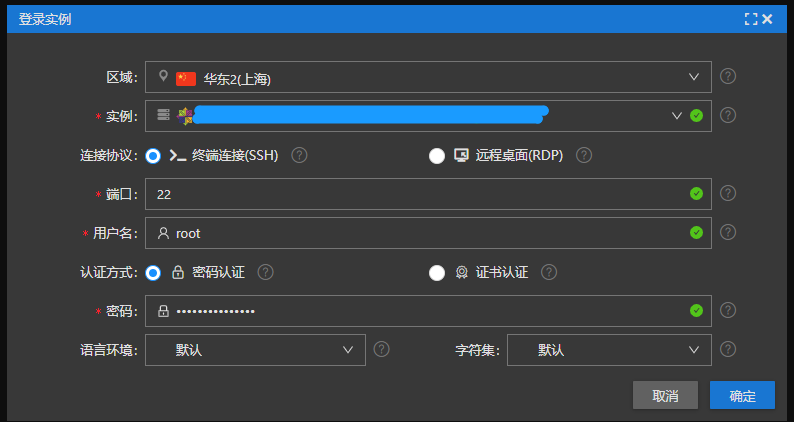
In this way, we enter the control end of the cloud server through the browser. (2) Through the local cmd command bar, enter ssh root@ipaddress, and then enter the server password to log in to the Alibaba Cloud server. (3) Log in through specialized Linux remote server editing software such as XShell. In this way, you gain access to the Alibaba Cloud server. It should be noted that centos on the cloud server is a Linux-based operating system. Different from Windows, it does not have the window system we are used to. It requires us to enter the command line to operate, so everyone needs a certain adaptation process when configuring it. If you are interested in Linux, I recommend you to read the following related tutorials. I recommend this book “Brother Niao’s Linux Private Cooking” to everyone.
- Configure samba on the server
(1) Install samba: sudo systemctl start smb.service sudo systemctl enable smb.service firewall-cmd —permanent —zone=public —add-service=samba sudo mkdir /samba 下面我们创建能够共享文件的用户组sambashare,并将/samba文件夹的所有权配置给sambashare sudo chgrp sambashare /samba (5) To create a samba user, we first create a user named josh sudo mkdir /samba/josh sudo chmod 2770 /samba/josh sudo smbpasswd -e josh 此时,显示: Enabled user josh. This indicates that the user configuration is successful. (7) After successful configuration, modify the samba configuration file: sudo systemctl restart smb.service $sudo systemctl restart nmb.service
- Connect to the server under Windows
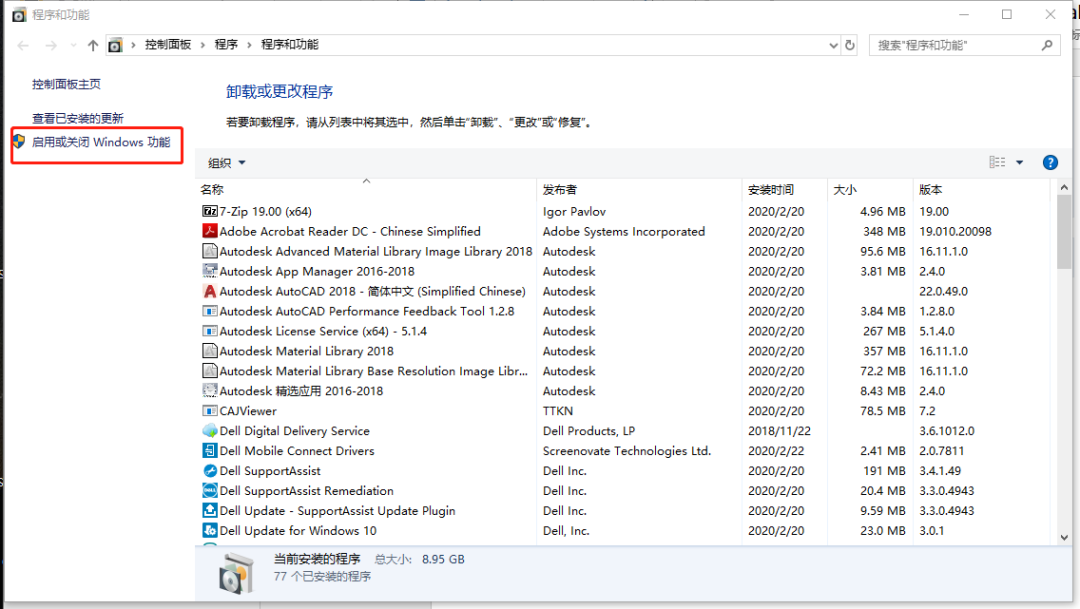
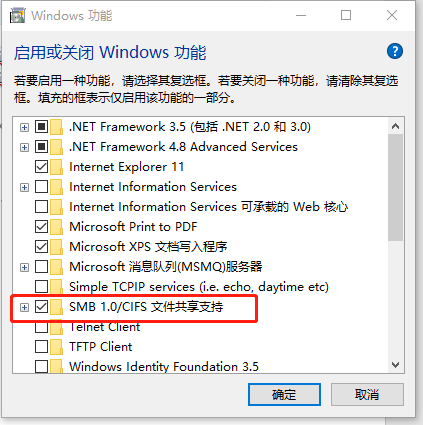
(1) Make sure windows can connect to the samba server:
(2) Map network disk to local:
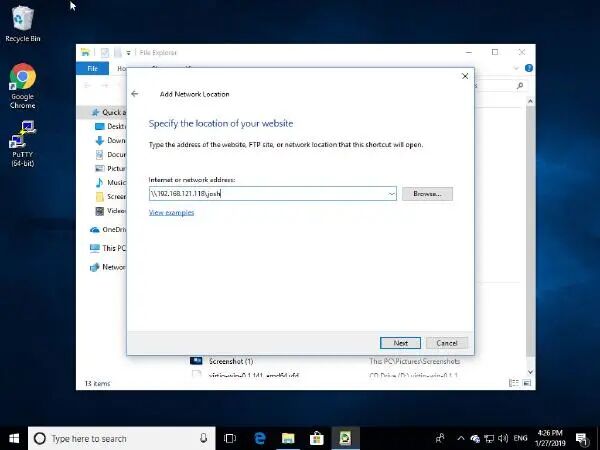
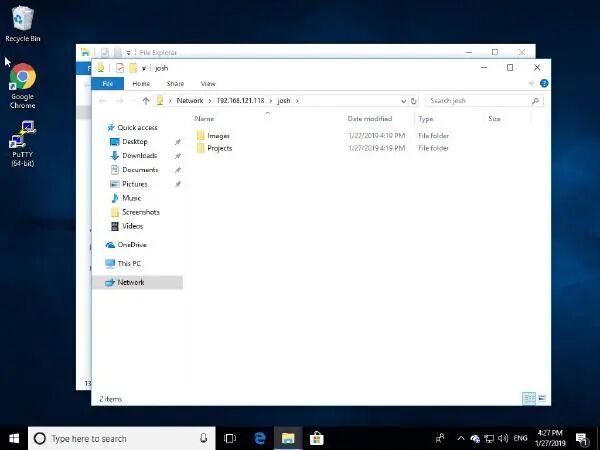
(3) Enter the previously configured username and password: In this way, the hard disk space on Alibaba Cloud is configured locally, and you can access the hard disk space on Alibaba Cloud just like your local hard disk.
- Extension
The above just describes a simple scenario of using the cloud platform to build a design work environment based on the cloud platform to improve the designer’s work efficiency. Compared with an architectural design company configuring an intranet server on the company’s intranet and building a working platform for the company’s intranet, its limitations are self-evident. We can only log in and access through the company’s intranet, which results in low collaboration efficiency. The collaborative design server built through the cloud platform can help us access our working directory anytime and anywhere, improving the degree of collaboration among designers. However, cloud servers can do much more than that for architectural designers. 很多人可能会对云的概念产生疑惑,通俗来讲,我们购买的类似阿里云等云服务商提供的云空间,本质上就是一台在云上的电脑。它有相应的cpu和硬盘空间。只要我们的客户端能够和云平台连接,那么,我们就能使用云平台上的算力资源和硬盘空间。云平台上算力和硬盘资源都是巨大的。这种资源对单个设计院的实体来说,只能不断地购买硬件,而单个主机的硬件资源是有上限的,而云平台上的资源可以不断地扩展,而且,购买云空间的成本相对而言也是比较低的。云平台上的算力资源和硬盘空间到底该如何使用,这完全取决于使用云平台的设计师或者团队。 Based on this, we can imagine various scenarios of introducing cloud platforms into architectural design workflows: (1)与BIM技术的结合,使设计流程中各方的协同程度达到一个新的高度。 在传统的工作流中,虽然很多建筑设计公司都有自己的协同工作平台,但是当下建筑,结构,机电等各专业之间的生态是相对封闭的。而在云上建立统一的BIM协同平台,使各个专业之间的工作对象都转变成统一的BIM模型,做到各专业间的设计成果做到无缝的衔接。 (2) Utilize computing resources on the cloud to improve the efficiency of design analysis. Taking the work of structural engineers as an example, during the design process we need to constantly update our yjk or pkpm structural model on our computers and perform calculations. So, since there are abundant cloud resources, why can’t we configure this kind of software on the cloud? The computing power resources of computers on the cloud are completely different from those of a single host. It is not that far away to use cloud platforms to widely introduce some cutting-edge algorithms into the design process. Imagine a scenario where as long as we define a BIM model on the cloud and set the relevant parameters, all design participants can obtain corresponding analysis results locally through the cloud. Does it feel like flying? (3) Connect the ports of Party A, the construction party, the supervision unit and the operation and maintenance team on the cloud platform to increase the participation of all project participants. Based on the cloud platform, through reasonable file permission layout, all parties in the project can view the progress or design results of the project design documents in real time according to their needs. In this way, opinions or information from all parties to the project can be fed back in real time. Based on the current way that Party A generally uses WeChat or phone to communicate with us, do you think it is too trivial? It is not impossible to build a communication system for project opinions based on the cloud platform so that the opinions of all parties in the project can be traced. In addition, the construction unit can also obtain the design documents of the design unit through the cloud platform, and the design unit can also check the construction progress of the construction unit through the cloud platform. Of course, there will be many application scenarios based on cloud space in the architectural design process, which requires everyone to develop slowly. Here are two related articles about cloud services in the AEC industry, which explain the significance of cloud space to the AEC industry. You can use them as supplementary reading materials.
(The Need for Industry Cloud Solutions in the AEC Industry
https://www.skysite.com/the-need-for-industry-cloud-solutions-in-the-aec-industry/
10 REASONS AEC FIRMS ARE MOVING TO THE CLOUD
https://www.advance2000.com/10-reasons-aec-firms-moving-cloud/)
- Summary
All in all, by introducing cloud computing resources and hard disk resources into our design workflow, we can abandon the company-based work environment of designers and make full use of cloud space resources to convert our actual three-dimensional space in the office into a virtual space on the cloud. We can log in to the cloud space at home to work. I think I am very happy after working from home during this period. It saves us time on the way to and from get off work. The working environment is relatively quiet and the work efficiency is relatively high. Of course, our communication efficiency will be relatively compromised. I believe that the gradual and widespread use of cloud in the design field will not happen overnight, it will take time. But I feel like the bosses will be happy because they can at least rent out two floors of offices and replace them with space on the cloud. Space on the cloud is much cheaper than office buildings.
往期精彩: Algorithms and data tell you | The turning point has been reached and the fight against the epidemic is about to be won! ! ! YJK raft punching is “not red”, does it pass? The algorithm tells you why staying at home is the first line of fighting the epidemic! ! ! From construction emergency plan to national emergency response 今天不想加班——Autolisp入门案例(二) Overview of the development of steel structure building systems “Simplified and light” cantilevered structure
*This document is automatically collected and organized by AI from non-deconstructed public accounts and is for learning reference only. *
LOADING…